Popular Posts

iPhone 5s


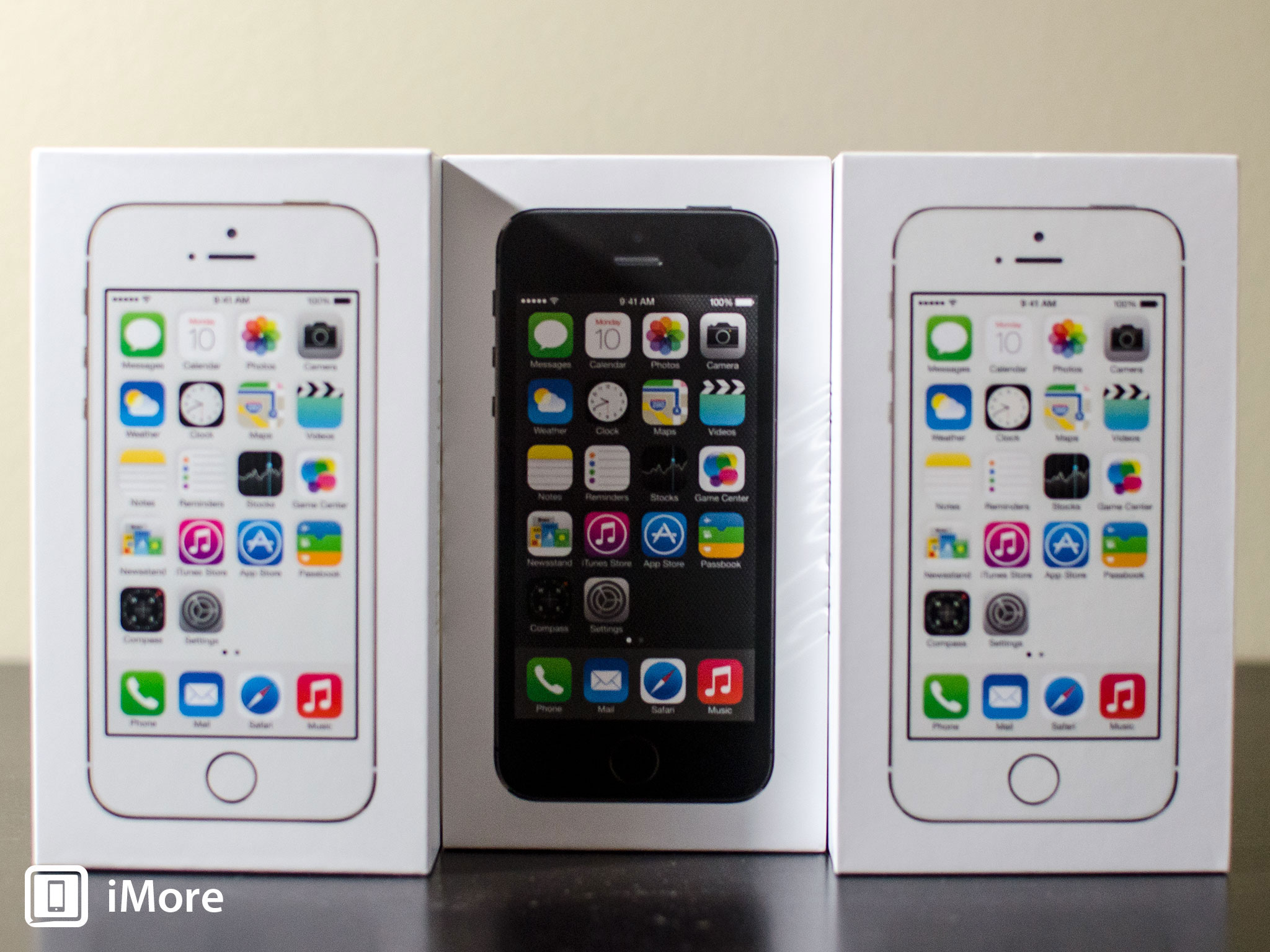
The iPhone 5s is Apple's current flagship phone. The 7th generation iPhone, it was introduced by Phil Schiller at the iPhone event on September 10, 2013 and released on September 20 alongside iOS 7. Physically the iPhone 5s looked identical to the previous year's iPhone 5, including the 4-inch 1136x640 in-cell display. But that's been true for every s-branded phone Apple has released to date. This year, however, there's one notable exception. This year the iPhone 5s not only comes in dark and light colors, space gray and silver respectively, but it comes in gold. Also, like every s-branded phone Apple has released to date, beneath a similar looking shell beats the heart of a much-improved beast.

iPhone 5s: Apple A7 and M7 chipsets

The iPhone 5s is powered by the 64-bit Apple A7 system-on-a-chip (SoC). It's the first 64-bit SoC on the market and that Apple got there before companies that fabricate their own chips is a testament to Apple's drive. The A7 includes a 1.3GHz dual-core custom Cyclone processor based on the ARM v8 instruction set, and a OpenGL ES 3.0-equipped PowerVR G6430 graphics processor. That means the iPhone 5s is not only one of the most advanced mobile devices on the planet but that it can run more complex apps and games faster and better than ever before. The Apple A7 architecture also includes Apple's first coprocessor, the Apple M7. The M7 collects all motion-related data — accelerometer, gyroscope, magnometer, etc. — in the background in a really power-efficent way and then shares it with iOS and apps so not only can your phone make sure your pedometer apps don't have any gaps, but can recognize when you're not moving and power down network connections to save even more power, or recognize when you get out of a car and switch you to walking directions.

iPhone 5s: Touch ID fingerprint identity sensor

Touch ID, Apple's fingerprint identity sensor, debuted with the iPhone 5s. It lets you use biometric authentication to unlock your iPhone and authorize purchases on the iTunes Store, App Store, and iBookstore. It works with a capacitive sensor that detects your finger, snaps a high-resolution image of it, converts it to a mathematical hash, sends it directly to a secure enclave on the Apple A7 chipset and, if it matches, releases a yes/no token that either verifies or rejects your print. Each Touch ID sensor is paired with a specific Apple A7 processor, and the fingerprints are never allowed out of the Touch ID system and never transmitted or stored on any servers. If your phone is rebooted or if you haven't used Touch ID for 48 hours, you'll have to use your passcode to reactivate it.

iPhone 5s: Pricing and availabilityiPhone 5s: iSight and FaceTime cameras

The rear-facing iSight has also been improved for the iPhone 5s. It's still 8 megapixels but it's got a wider f/2.2 aperture and bigger 1.5 micron sensor. Thanks to the new image signal processor (ISP) in the Apple A7, the iPhone 5s iSight camera also gets better balance, better exposure, better sharpness, better low-light, less color distortion, less motion blur. Not only that, it can take bursts and intelligently find and present you with the best shots in the series. It can also handle exposure dynamically for panoramas, and it even includes a TrueTone flash with both blue and yellow elements for better color reproduction in extreme low-light situations. To top it all off, the iPhone 5s can record 720p video at 120fps for silky-smooth slow motion with full control over in and out points.
The front-facing FaceTime camera on the iPhone 5s was also improved. The sensor size went to 1.9 microns and Apple changed to a back illuminated sensor (BSI). Always wanted better low-light selfies? Knock yourself out!

iPhone 5s: LTE and Wi-Fi

The 4G LTE radio now handles more bands in more places than ever before, and while Apple didn't add 802.11ac networking to the iPhone 5s, they did add multiple-in/multiple-out (MIMO) to make the existing 802.11n networking rock-solid. Bluetooth remains top-of-the-line 4.0 Low Energy.

iPhone 5s: Pricing and availability

The iPhone 5s is available now. It retails on-contract in the U.S. for $199 for 16GB, $299 for $32GB, and $399 for 64GB. Off contract the iPhone 5s goes for $650, $750, and $850 respectively.

iPhone 5s: What's next?

Welcome The Blackberry Z10


Design

 Size

  • Height 130 mm / 5.11 in
  • Width 65.6 mm / 2.58 in
  • Depth 9 mm / 0.35 in

Weight

  • 136g / 4.80 oz

Navigation

  • All-touch screen, with intuitive gesture based navigation

Keyboard

  • On screen BlackBerry Keyboard (portrait/landscape), featuring contextual auto-correction, next-word prediction, and a personalized learning engine that gets to know the way you type

Dedicated keys

  • Volume Up/Down, Mute, Lock (for Power On/Off)

Display

Resolution

  • 1280 x 768 resolution, at 356 PPI
  • 24-bit color depth

Screen size

  • 4.2" diagonal
  • 15:9 aspect ratio

OS & desktop software

Operating system

  • BlackBerry 10 OS

Desktop software

  • BlackBerry® Link software for your computer to enable synchronization of data and media

Performance

Processor

  • Dual Core 1.5 GHz

Memory

  • 2GB RAM
  • 16GB Flash

Expandable memory

  • Removable microSD memory card – slot under battery door (Up to 32 GB)

USB Ports

  • USB 2.0 high speed port – allows charging and data synchronization of the device with a USB cable

HDMI Port

  • Micro HDMI for connection to your HDTV or projector

Power

Battery

  • 1800mAH removable battery

Battery Life

  • Up to 11 hours talk time (3G)
  • Up to 17 days standby time
  • *Note: Battery life claims are for Model STL100-1

Camera & video

Rear camera

  • 8 megapixel auto-focus camera
  • Back Side Illumination for better low-light performance
  • 5-element F2.2 lens
  • Flash, continuous and touch to focus, image stabilization
  • 5 x digital zoom
  • 1080p HD video recording
  • Time Shift mode for pinpointing and adjusting individual elements of your picture

Front camera

  • 2 megapixel fixed-focus camera
  • Image and video stabilization
  • 3x digital zoom
  • 720p HD video recording

Multimedia

Image formats

  • BMP, WBMP, JPG, GIF, PNG, TIFF, SGI, TGA

Audio & video formats

  • 3GP, 3GP2, M4A, M4V, MOV, MP4, MKV, MPEG-4, AVI, ASF, WMV, WMA, MP3, MKA, AAC, AMR, F4V, WAV, MP2PS, MP2TS, AWB, OGG, FLAC

Audio & video encoding/decoding

  • H.264, MPEG-4, H.263, AAC-LC, AAC+, eAAC, MP3, PCM, Xvid, AMR-NB, WMA 9/10, WMA10 professional, WMA-LL, VC-1, VP6, SPARK, PCM, MPEG-2, MJPEG (mov), AC-3, AMR-WB, QCELP, FLAC, VORBIS

Apps

Pre-loaded apps

  • BlackBerry® Hub, Contacts, BlackBerry® Browser, BlackBerry® Calendar, BBM, Text Messages, BlackBerry® World, BlackBerry® Remember, Docs To Go™, Pictures, Story Maker, Facebook®1, Twitter®1, LinkedIn®1, Foursquare®, BlackBerry® Maps, Games, YouTube®, Voice Control, Weather, Clock, Calculator, Compass, File Manager, Box, BlackBerry® Connect for Dropbox, Print To Go, Smart Tags, Settings, Adobe® Reader, Phone, Camera/Video Camera/Time Shift, Setup, Help, SIM Toolkit, Search

Security

  • Password protection, screen lock, and sleep mode
  • BlackBerry® Balance™ offering dedicated profiles to keep work and personal data separate and secure

Alerts & notifications

  • Tone
  • Vibrate
  • On-screen or LED indicator

Voice input/output

  • Integrated hands-free speakerphone
  • Hands-free headset capable
  • Bluetooth headset capable

Network & connectivity

Network bands

  • 21Mbps HSPA+
  • Quad band HSPA+ 1, 2, 5/6, 8 (850/900/1900/2100 MHz)
  • Quad band EDGE (850/900/1800/1900 MHz)

Wi-Fi®

  • 802.11 a/b/g/n
  • 2.4 GHz / 5 GHz
  • Mobile Hotspot

Bluetooth®

  • Bluetooth 4.0 Low Energy (LE)

GPS

  • Assisted, Autonomous and Simultaneous GPS
  • Preloaded with BlackBerry Maps application
  • GLONASS Support

NFC

  • BlackBerry® Tag with NFC technology enables communication between BlackBerry smartphones and other NFC-enabled devices with a tap

Sensors

Advanced Sensors

  • Accelerometer
  • Magnetometer
  • Proximity sensor
  • Gyroscope
  • Ambient light sensor

Accessibility

  • BlackBerry® Magnify, for customers with partial vision -
  • Adjustable screen brightness, scalable fonts
  • Teletypewriter (TTY)

BlackBerry Torch 9810: 10 things you need to know


RIM’s on a roll with the BlackBerry Bold 9900 and BlackBerry Torch 9860, and now the BlackBerry Torch 9810 is ready to fill the gap in the middle. Read on to find out everything you need to know about the device.

Slide-out qwerty

Like the BlackBerry Torch 9800 (of which this is a direct descendent), the BlackBerry Torch 9810 features the best bits of RIM’s two types of smartphone – a qwerty keyboard (portrait view, of course) and a full-size touchscreen. How does it cram all this into one compact shell? By storing the qwerty behind the screen and enabling you to slide it out.


3.2-inch touchscreen

As mentioned, on top of that qwerty sits a decently proportioned touchscreen. At 3.2-inches, it’s almost half an inch bigger than the BlackBerry Bold 9900′s, which demonstrates why RIM wanted to work the slider mechanism in. There’s also no sign of the unorthodox SurePress tech that put a number of people off the Storm series.


1.2GHz processor

The BlackBerry Torch 9810 might be the middle child of the new BlackBerry family, but it’s certainly not middle of the road. It features the same 1.2GHz processor as the BlackBerry Bold 9900 and the BlackBerry Torch 9860, which effectively doubles up on the power of previous BB generations.


Adreno 205 GPU

The BlackBerry Torch 9810 has a dedicated Adreno 205 GPU, which will boost performance considerably – particularly when it comes to high def video and 3D games. It’s the same chip that can be found in the Sony Ericsson Xperia Play – the so-called ‘PlayStation phone’, which gives you an idea of its pedigree.


YOU SHOULD READ – BlackBerry Messenger 6 connected apps revealed

5-megapixel camera

The previous generation of BlackBerry Torch had a 5-megapixel camera, so it might seem as if no progress has been made with the BlackBerry Torch 9810. However, look closer and you’ll see a couple of new features such as Face Detection, 4 x digital zoom (as opposed to 2 x), geo-tagging and high definition video recording. Most importantly, the new device features “zero shutter lag” producing a quicker, more responsive shutter button.


BlackBerry 7 OS

The new BlackBerry OS won’t be coming to earlier BlackBerry devices as a software update for the simple reason that they can’t handle it. It’s quicker, better looking and more feature packed than ever, and is one of the prime reasons the BlackBerry Torch 9810 has received such a hefty power boost.
Docs To Go Premium

The BlackBerry Torch 9810 will come with Docs To Go Premium, which offers you the ability to create, view and edit documents, as well as a few extra features. According to the developer’s website, you can also open password protected files and spell check word processed files from the comfort of your BlackBerry

BlackBerry Messenger 6

BBM6 is a big improvement over the most popular instant messaging service around. Now, apps are being created that integrate with the service, allowing you to chat while playing multiplayer games (for example). You also get a persistent profile that gives to awards for downloading certain apps and lets your friends know what you’ve been enjoying


Next gen web browser

The new BlackBerry 7 OS web browser is a marked improvement over previous versions. Making full use of the BlackBerry Torch 9810′s radically enhanced hardware, it promises to load up web pages 45 per cent faster than previous BB web browsers. The interface has also been improved with pinch zoom.


NFC

NFC stands for Near Field Communications. It’s the technology that will enable you to make payments in shops with your phone, and will (according to many) prove to be the death of the credit card. You might think that its presence in the BlackBerry Torch 9810 is a bit premature, but one estimate suggests that 40,000 businesses could be using NFC by the end of 2011. Plus, the London Olympics in 2012 will push NFC’s adoption in the capital hard

Getting Started with Your BlackBerry Torch 9800 Smartphone


Started with Your BlackBerry Torch 9800 SmartphoneLearn how to get started with your BlackBerry® Torch™ 9800 smartphone, featuring the all new BlackBerry® 6 OS. Set it up, master the basics, make it your own and find support if you need it.


Setup

Messages

Browser

BBm

Media

Social

Camera

Contacts

Calendar

App World

Games

Help

Manage

Options

Get to know your Home screenEnjoy personalized settings and one-touch access

to the apps you use most on your

BlackBerry Torch 9800 smartphone Home screen.


Learn how to navigate and personalize your

new Home screen

View the BlackBerry Torch 9800 Demo

Learn about BlackBerry® Desktop Software


Do You Have the Latest Smartphone Software?You may be able to enjoy feature and

functionality enhancements by updating

your smartphone software.
http://us.blackberry.com/support/devices/blackberrytorch9800.jsp

Nokia 2600 Classic disassembly


  • First remove the battery cover, battery and sim. Two clips hold the front cover in place (circled) so release them.

Nokia 2600 Classic disassembly stage 1

  • You should now have the front cover removed. Remove the screws you can see.

Nokia 2600 Classic disassembly stage 2

  • Flip the frame from left to right but take note that it is still attached by a ribbon. The release this, flick the black latch (circled) up then pull the metal frame away from the phone.

Nokia 2600 Classic disassembly stage 3

  • The circuit board will still be attached at the bottom of the phone so move it to one side slightly to access the ribbon connector from the LCD screen. The connector attaches like a plug and socket. Lift the connector up, away from the phone to unplug it. The LCD screen will now be free.

Nokia 2600 Classic disassembly stage 4

  • You should now have the LCD screen removed. Reverse the procedure for reassembly.

Nokia 2600 Classic disassembly stage 5


If you have any questions about Nokia 2600 Classic disassembly, email rob.lee@formymobile.co.uk. The official service manual for this phone may also help you with further Nokia 2600 Classic disassembly. Click here for details